
Choosing a World
My Worlds is where you land, and its job is to answer one question: which world do you want to open? Each world gets a full-width row carrying the handful of facts that actually help you decide.
What a row tells you
Section titled “What a row tells you”Take a world called Verenthia, four months into a drowned-empire fantasy:
Verenthia · Fantasy — A drowned empire above the tide line, where the archivist houses trade in oaths rather than coin.
Entities Content units Books & Domains Last edit 341 1,204 8 · 2 Astrid Deepstone — Character · pick up here Edited 2 hours ago
Four numbers, and the last thing you touched. Here is the same kind of row in the app, found by typing its name into the search box:
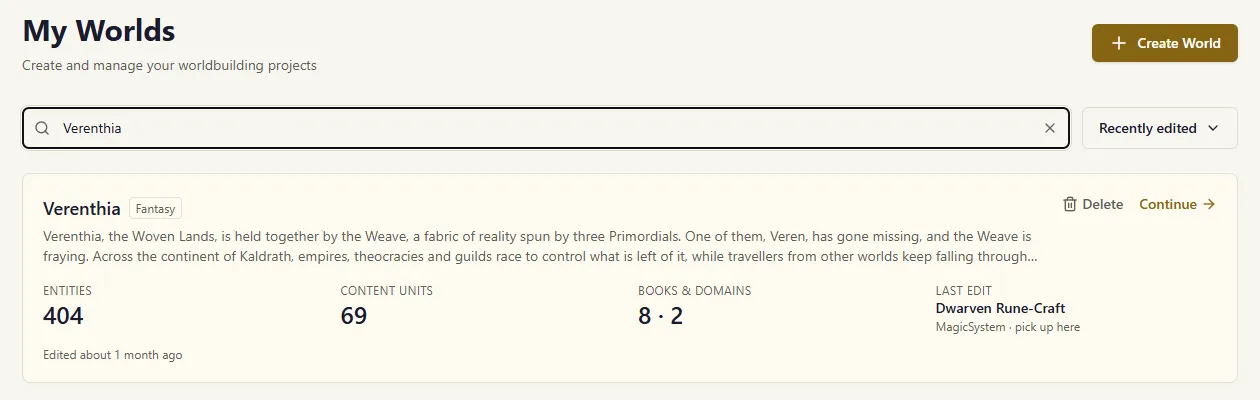
Entities is everyone and everything you have written down — characters, places, items, factions.
Content units is your actual writing: scenes, articles, session notes. The prose, not the index cards.
Books & Domains counts the two kinds of container holding most of your writing. This one is named after your world, not a fixed pair. If you build in Chronicles and Regions, the column says Chronicles & Regions. If you have only one kind, it names that one. If your container names are long enough to crowd the row, it falls back to a plain Containers total rather than squeezing.
Last edit names the most recent thing you worked on, anywhere in the world — an entity, a scene, a chapter. This is what makes Continue mean something: not “go back to Verenthia” but “go back to Astrid Deepstone”.
Sorting
Section titled “Sorting”The default sort is Recently edited, and it now means what it says: the order follows the last time you actually wrote something. Renaming a world or changing its settings no longer pushes it to the top.
The other sorts — Recently created, Name, Genre — are unchanged.
You can also search by name or genre.
A world you have not started yet
Section titled “A world you have not started yet”A brand-new world reads differently, on purpose. Instead of a resume it offers a next step:
Elsewhere · Fantasy — No description yet — it feeds chat context and extraction, so it is worth two minutes.
Entities Content units Containers Next step 0 0 0 Add your first entity or import a world Created 29 Aug, never edited
The action says Open rather than Continue, since there is nothing yet to continue. The created date appears only here — once a world has any history, the row reports the edit instead, which is the more useful of the two.
How many worlds you can have
Section titled “How many worlds you can have”Your plan sets a ceiling, and the page says where you stand in a small line above the heading:
1 of 2 worlds on Founder
That line is there whether or not you are near the limit — knowing you have one slot left is more useful than being told after it has gone. Once every slot is taken it adds what to do about it, and a quiet note appears under the list:
All 2 Founder slots are in use. Deleting a world frees one.
Create World is unavailable until you free a slot. You can delete a world with Delete on its row in My Worlds, or from its own settings page under Danger Zone — see World Settings.
If you are over the limit
Section titled “If you are over the limit”Moving to a smaller plan does not take any world away from you. It can leave you holding more than the new plan allows, and the page says so rather than pretending you are merely full:
30 of 3 worlds on Lorekeeper · 27 over your plan
with, under the list:
Your Lorekeeper plan holds 3 worlds. Delete 27 to get back under it, or upgrade to keep them all.
Upgrading keeps every world; deleting is the other way back.
You then have two weeks to decide what to do about it. Nothing changes during those two weeks — every world stays open and every world stays writable, exactly as before. The count simply tells you the truth while you think.
If the two weeks run out and you have not chosen, the worlds you have been working in most recently stay active, and the rest are set aside. A world that has been set aside is still yours:
- it stays in your list, marked
- you can open it and read everything in it
- you can export it, in full
- what you cannot do is write in it
Nothing is ever deleted. Your worlds outlive your subscription.
Three things bring a set-aside world back, and any of them works at any time:
- upgrade, and every world becomes writable again
- delete a world, and once the count is back within your plan the rest unlock
- choose differently — swap which worlds are active whenever you like, including long after the two weeks have passed
That last one is the important one. Being set aside is never permanent and never a decision you cannot revisit.
If your plan includes no worlds
Section titled “If your plan includes no worlds”The Free plan has no worlds of its own. Cancelling a paid plan lands you there, and your worlds do not go anywhere:
5 worlds · your Free plan does not include any
with, under the list:
Your Free plan does not include worlds. Yours are still here — upgrade to keep working in them.
There is no deletion count here, because no number of deletions puts you inside a plan that includes none. Nothing is removed when you cancel, and nothing is removed later.
On a plan with no ceiling, none of this appears.