
AI Summaries
MythTapestry can write a short summary of a scene, a session, an article — any single piece of writing — so you have a quick recap to scan instead of re-reading the whole thing. Nothing is summarised until you click the button.
What a summary looks like
Section titled “What a summary looks like”When you trigger it, the AI reads the piece of writing and produces a few sentences covering the key beats: what happened, who was involved, where, and the details that matter. It’s meant to be the kind of recap you’d put at the top of a session brief or in a “previously on…” note for yourself.
Generating one
Section titled “Generating one”Open the scene in the editor, go to the Overview tab of the right-hand panel, and click AI Generate beside Summary. The new summary replaces what was in the box, and an AI-generated badge marks it. You can edit it like any other text.
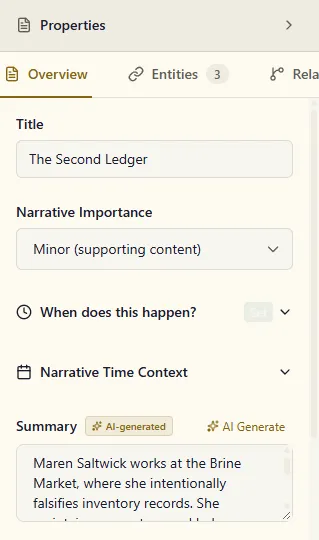
The button appears once the scene has been saved at least once. Chapters, books and other containers don’t have one — summaries are written per scene.
If the AI can’t produce a summary (the provider is down, say), the editor tells you so and nothing is saved: a summary you already had stays as it was, and an empty one stays empty. Generate again later.
Where summaries help
Section titled “Where summaries help”- Browsing the graph — click a scene node and its summary tells you what happens there without opening it
- Chat recall — the chatbot relies on summaries when you ask broad questions (“what’s happened to Aldric so far?”) so it doesn’t have to read every scene
- Session recaps — for TTRPG campaigns, the session summary doubles as your “previously on…” for the next session