
Inline Temporal Marks
Scenes are full of time: “the spring the river froze”, “three days after the coronation”, “15th of Frostmoon, Year 42”. MythTapestry lets you tell it which date in your world each of those means, so your writing lines up with your timeline. There are two ways to do it.
- A date chip drops a date into the text: a small badge that reads, say, Mythara’s Bloom 3, Year 1.
- A date link leaves your words exactly as you wrote them and ties them to a date underneath, the way an entity link ties “the old fortress” to a place.
Date chips
Section titled “Date chips”Adding a date chip
Section titled “Adding a date chip”Type [[ in the editor. A date picker opens where you’re typing, with a search box at the top and five tabs:
- Date: pick a day from your world’s calendar.
- Entity: use a date that belongs to an entity, such as a character’s birth date.
- Events: use the date of one of your world events, such as The Unraveling.
- Patterns: use a day from a recurring pattern, such as the next market day.
- Text: type the date the way you’d write it, and let MythTapestry read it.
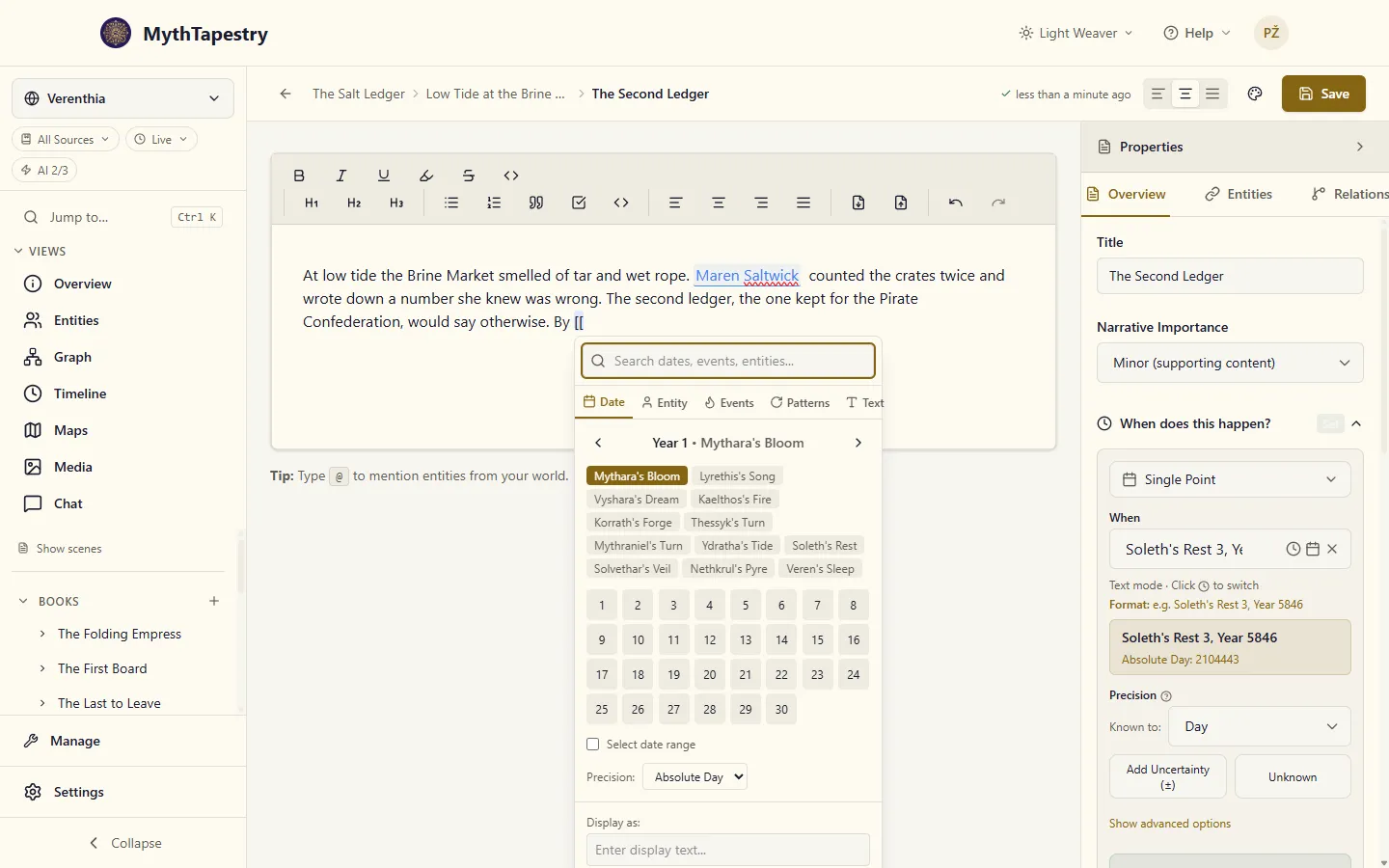
On the Date tab, the picker opens at the start of your calendar. Use the arrows beside the year to move to the one you want, choose the month, then the day. Tick Select date range to pick an end day as well, for something that lasted, like a siege. Precision says whether you mean the day as a whole (Exact day) or a moment within it (With Time).
Choose With Time and a Time row appears, with one box for each way your calendar divides its day. In Verenthia that’s a single Bell box; a calendar with hours and minutes shows Hour and Minute. Type the moment, say Bell 6, and the chip remembers it. On a range you get a Start time and an End time. If both fall on the same day, the end can’t come before the start: the picker says Ends before it starts and won’t insert until you fix it. Leave the boxes empty and the chip is about the day as a whole.
If your calendar doesn’t divide its day at all, With Time can’t be chosen, and the picker says so: This calendar doesn’t divide its day. See Time & Subdivisions to add divisions.
The Text tab is the quickest when you already know the date. It shows an example in your calendar’s own format. Type something like it, and the picker shows what it reads your text as before you commit. Click Apply this date if it’s right. If what you typed includes a time, the chip keeps that too. If it can’t make sense of what you typed, it says so and suggests what to try.
Whichever tab you use, the Display as box at the bottom holds the words the chip will show. Pick a day and it fills in the date the way your calendar writes it, such as Mythara’s Bloom 3, Year 1, or both ends of a range. Set a time under With Time and it’s added too, in your calendar’s own divisions of the day: Mythara’s Bloom 3, Year 1 at Bell 9. Type your own words instead if you’d rather the chip read “the Harvest Moot”; picking another day or time won’t overwrite them. Then click Insert.
What a chip shows
Section titled “What a chip shows”Hover over a chip to see the date it stands for, written in your calendar, how precise it is, and where it came from: a date you picked, an entity’s date, an event or a pattern. A chip that carries a time of day shows it in your calendar’s own divisions of the day, such as Bell 6.
A chip with no words of its own reads its date, and its time, the way your calendar writes them: Soleth’s Rest 3, Year 5846 at Bell 6. That’s also how a chip made with the [[date:…]] shorthand reads.
A chip that takes its date from an entity or an event keeps track of it. If you later move The Unraveling to a different year, the chip notices: it shows a small yellow dot, and its hover shows the new date. The words on the chip stay as you left them, so you can decide whether the sentence still reads right. A chip whose source can’t be found any more, because the event was deleted for instance, gets a red ring.
Date links
Section titled “Date links”A date link is for the times you want to keep your prose as written: “that winter”, “during the long siege”, “the morning after the wedding”. The words stay ordinary, editable text. The link sits underneath, so MythTapestry knows which date they refer to.
Linking words to a date
Section titled “Linking words to a date”- Select the words that refer to a time.
- Right-click and choose Assign Date/Time….
- Pick the date in the same picker the chips use, with a time if you need one. If the words you selected are already a date, such as
1205-03-14, the Text tab has read them for you; check what it found and click Apply this date.
Your words stay as they are, so for a link the Display as box holds what the hover shows instead. It fills in with the date and time you pick; leave it, or type a note of your own.
The linked words get a light highlight. Hover over them to see the date they’re tied to.
To change or remove a link later, right-click the linked words and choose Change Date/Time… or Remove Date Link. Changing a link that has a time opens the picker on that time.
Which calendar a link uses
Section titled “Which calendar a link uses”A date link reads its date against a calendar, and it uses the closest one it can find:
- the calendar you chose for the link itself,
- otherwise, the calendar set for the content unit in its narrative time,
- otherwise, your world’s default calendar.
So a scene set in a city that keeps its own calendar can use that calendar throughout. Any links in it read the same way, and you only need to say so once, on the content unit.
If your world has no calendar yet and the content unit doesn’t name one, there’s nothing to read a date against. The date picker tells you so. Create a calendar first, then come back and link the date.
Chip or link?
Section titled “Chip or link?”| Date chip | Date link | |
|---|---|---|
| Your text | Replaced by the chip’s wording | Kept exactly as you wrote it |
| Editable | No, it’s one piece | Yes, it’s ordinary text |
| Looks like | A small badge | A light highlight |
| Best for | Stating a date outright: “15th of Frostmoon, Year 42” | Natural phrasing: “that winter”, “during the war” |
| How to add | Type [[ |
Select the words, right-click, Assign Date/Time… |
| Where the date comes from | A day you pick, an entity, an event or a pattern | A day or a span of days you pick |
Where your dates go
Section titled “Where your dates go”Chips and links are saved with your writing whenever the content unit saves, the same way entity links are. They become part of your world’s timeline, ready for features like time-based viewing.
Not yet available
Section titled “Not yet available”- Finding writing by date. You can’t yet search for every scene that mentions a given day or period.
- Prose on the timeline. The timeline shows entities and events, not the passages of writing that mention a time.
- Dates that follow calendar changes. If you rename a month, links you made earlier keep showing the old name on hover until you assign the date again.
- Chat that reads your dates. The chatbot can tell you what was true at a point in time from your entities and relationships, but it can’t yet find a scene by the dates written into it.