
Viewing Your World in Time
Your world isn’t a snapshot — people are crowned and dethroned, alliances form and shatter, cities burn and are rebuilt. The “Viewing as of” selector lets you look at your world as it stood at any moment of its history: while drafting Book 1, see your cast as they were then, not as they end up three books later.
The time selector
Section titled “The time selector”At the top of the world sidebar, under the world’s name, sits the time chip. It normally reads Live — the latest state of everything. Click it to pick a moment:
| Option | What it does |
|---|---|
| Live / Latest | The default — everything as it currently stands |
| Latest in canon | Jumps to the furthest moment your dated content has reached |
| After ⟨book / campaign⟩ | The world as it stands once that book or campaign ends — perfect for “where was everyone at the end of Volume One?” |
| Custom | Any date you type or pick in your world’s calendar, with a time of day if your calendar divides its day |
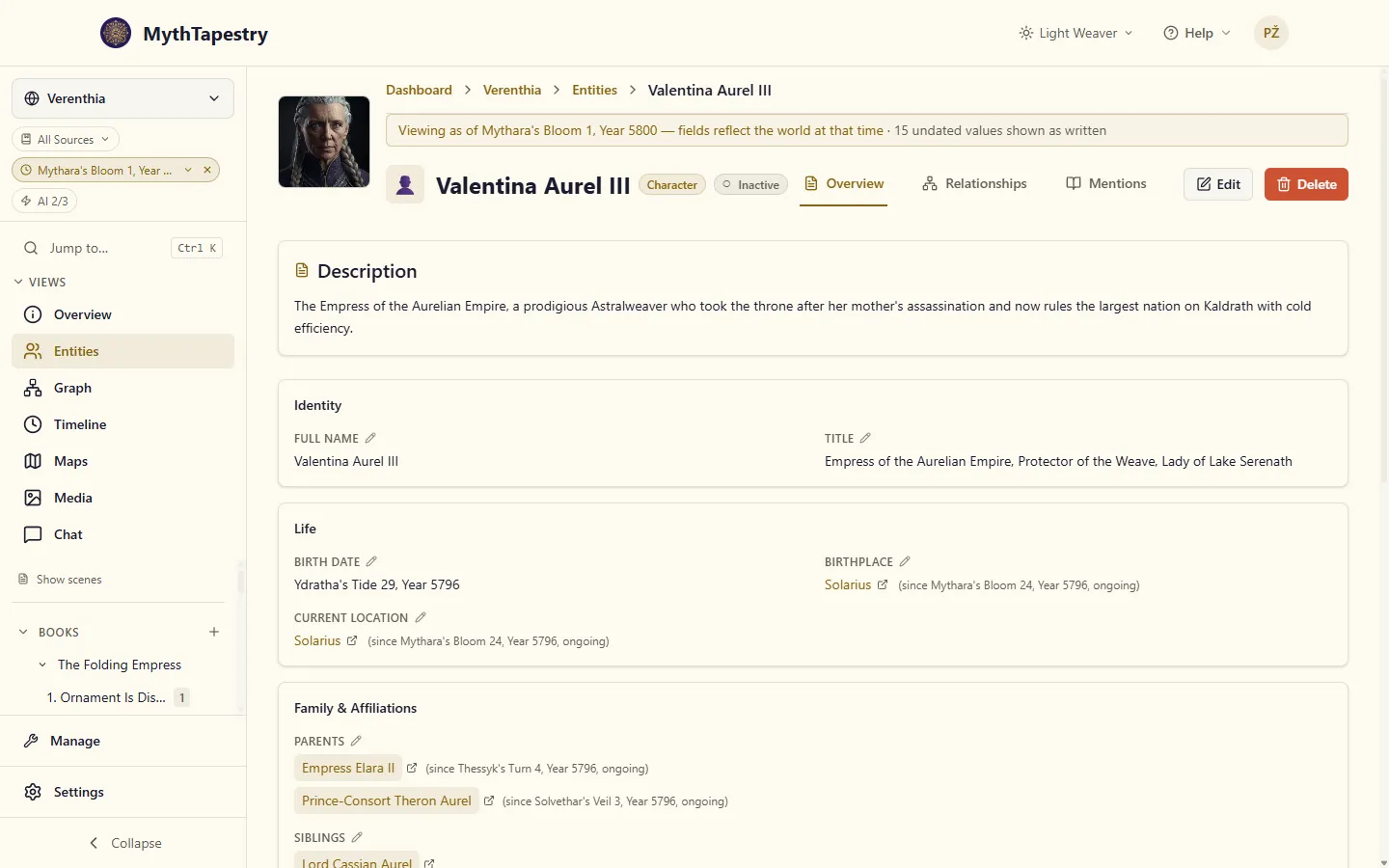
While you’re viewing the past, the selector is highlighted and shows the chosen moment in your world’s own calendar. A custom moment reads as a date there and in the banner above an entity, 14 March 1205 rather than a day count. Press Enter or pick a day in the calendar and the view moves at once. Click the × (or choose Live / Latest) to come back to the present. When the sidebar is collapsed, a highlighted clock icon reminds you that you’re time-travelling.
What changes when you look back
Section titled “What changes when you look back”Suppose Elara starts Book 1 as Princess Elara, is crowned in its finale (Year 512), and marries Lord Kellan in Book 2 (Year 515).
- The entity list shows names as they were. Viewing after Book 1, the list says Queen Elara; viewing a day before the coronation, she’s still Princess Elara.
- Entity details reflect that moment. Fields you’ve changed with a date — her title, her seat, her status — show the value that was true at the chosen time. A banner above the entity reminds you which moment you’re looking at.
- Relationships come and go. Her married to Kellan relationship only appears when viewing Year 515 or later. Relationships filter by their own start and end dates — a relationship with no end date simply never stops being shown, and one with no start date has always been there.
In Live, there is no “today” in your world to measure against, so a relationship with an end date counts as ended. The entity’s Relationships tab hides ended relationships until you turn on Show ended. They then appear alongside the others with the day they ended, ready to open and edit. Elara’s betrothal to the Duke of Varn, broken off in Year 511, is out of sight in Live and back in the list the moment you view Year 510.
Editing while viewing the past
Section titled “Editing while viewing the past”Here’s where it gets powerful: edit an entity while time-travelling, and your change is dated at the moment you’re viewing.
- Set the selector to after Book 1 (say, Year 512).
- Open Elara and change her title to Queen of Valdris.
- Save. The change is recorded as happening in Year 512.
Now viewing Year 500 still shows Princess, Year 512 onwards shows Queen — and you built that history just by editing what you saw.
Two rules keep this safe:
- Editing the past never rewrites the present. If Elara is already Empress by Year 530 and you record her Year 512 title as Queen, her live entry stays Empress — the earlier value slots into history where it belongs.
- Editing live stays simple. With the selector on Live / Latest, edits work exactly as they always have: they update the current value, no dates involved. Fixing a typo doesn’t create a historical event.
Where this shines
Section titled “Where this shines”- Drafting earlier books — set the view to after Book 1 while writing Book 2, so every entity you open shows what your characters (and readers) know at that point.
- Prequels and backfill — viewing Year 300, record the founding of the kingdom, long-dead rulers’ titles, and old alliances without disturbing the present day.
- Campaign recaps — set the view to after Session 12 and see exactly which NPCs the party had met, and who was still alive.
- Continuity checks — jump to any date and confirm who held the throne, who was married to whom, and which city had already fallen.