
Understanding Relationships
Relationships are directed edges in the knowledge graph that connect entities. Every relationship has a type, a direction, and optional temporal, spatial, and extended property context.
Directionality
Section titled “Directionality”All relationships are directed — they go from a source entity to a target entity. Each relationship type defines two labels:
- Forward label: “Parent of” (source → target)
- Reverse label: “Child of” (target ← source)
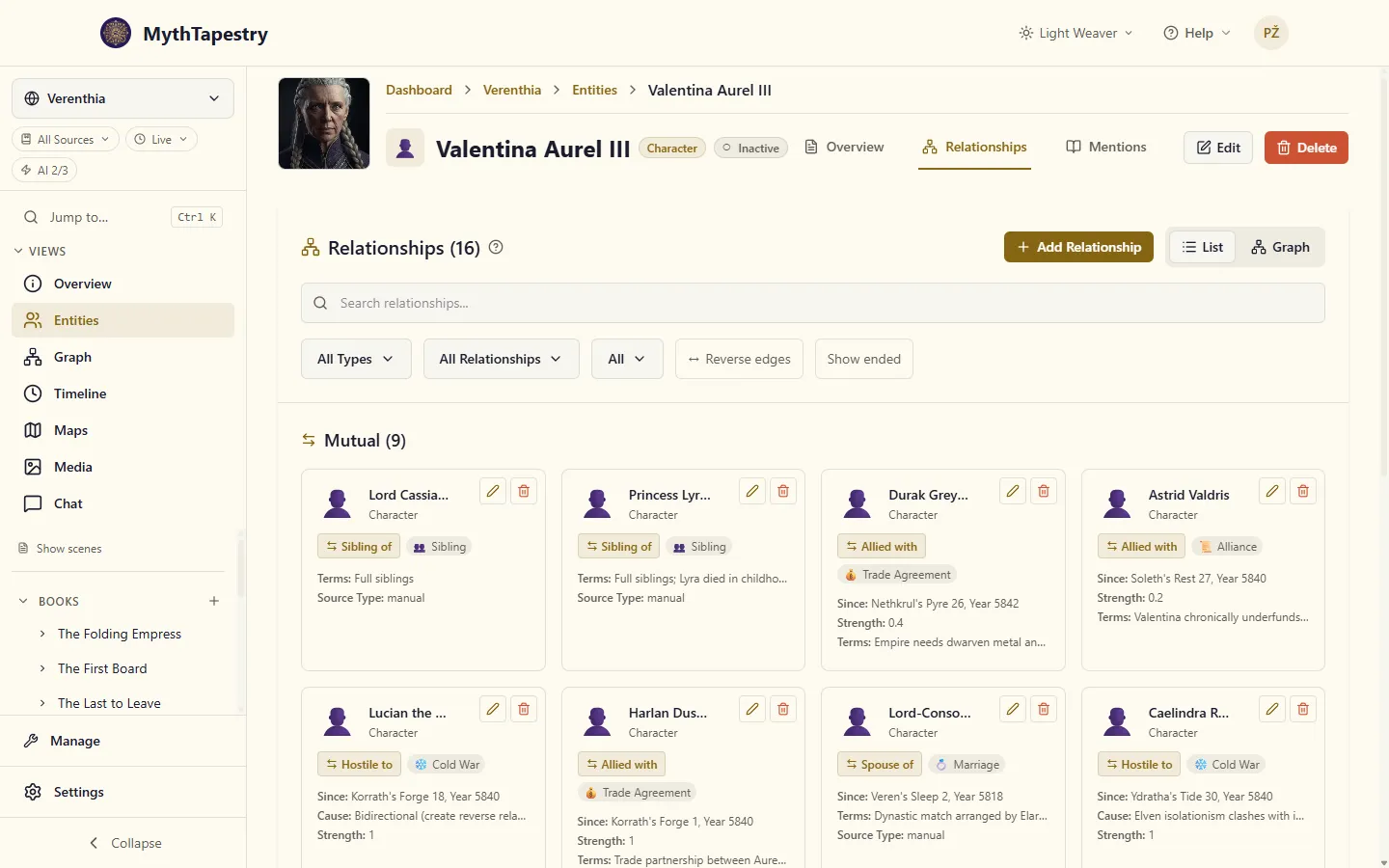
When you view an entity’s relationships, they are sorted into three groups: Mutual for symmetric ones like Sibling of or Allied with, where direction means nothing; Outgoing, where this entity is the source; and Incoming, where it is the target. Each is displayed with the label that reads correctly from this entity’s side. A symmetric type reads the same from both sides, so pickers and the Relationship Types page name it once (Allied with, not Allied with / Allied with).
Relationship type constraints
Section titled “Relationship type constraints”Each relationship type defines rules about which entities it can connect:
| Constraint | Description | Example |
|---|---|---|
| Allowed source types | Which entity types can be the source | Character, Organization |
| Allowed target types | Which entity types can be the target | Location, Organization |
| Max concurrent | Maximum active relationships of this type per entity | 1 for “Lives in” (only one home), null for unlimited |
These constraints are enforced when creating relationships — the UI only offers valid relationship types for the entity pair you’re connecting.
Temporal context
Section titled “Temporal context”Relationships can optionally have a temporal dimension:
- valid_from — when the relationship started (absolute timestamp)
- valid_to — when the relationship ended (null if still active)
This is controlled by the has_temporal_context flag on the relationship type. When enabled, the graph’s temporal controls can filter relationships by time period — showing you the state of your world at any point in its history.
A relationship can’t end before it starts. If you give it a Valid Until earlier than its Valid From, the dialog says so beside the dates and won’t save, because a link like that would exist at no moment and never show up anywhere. A relationship that starts and ends on the same day is fine. To make a relationship ongoing again, clear Valid Until and save.
For example, a “Member of” relationship between a character and a guild might be valid from Year 100 to Year 115, indicating 15 years of membership.
Spatial context
Section titled “Spatial context”Relationships can also carry spatial context when the has_spatial_context flag is enabled:
- Location — a primary location associated with the relationship
- Marker override — a custom map position
- Additional locations — multi-point references (e.g. for trade routes)
Extended properties
Section titled “Extended properties”Relationship types can define custom fields beyond the standard attributes. These use the same field definition system as entity types — text, numbers, selects, and more.
For example, a “Parent of” relationship type might have an extended property for the subtype of parenthood (biological, adoptive, step, foster, guardian).
Subtypes
Section titled “Subtypes”Relationship types can have subtypes for finer categorisation. Each subtype has:
- Value — internal identifier (e.g. “biological”)
- Label — display name (e.g. “Biological”)
- Description — explanation (e.g. “Birth parent sharing genetic material”)
- Icon — visual indicator
For instance, the “Parent of” system type includes subtypes: biological, adoptive, step, foster, guardian, divine birth, surrogate, and mentor.
System relationship types
Section titled “System relationship types”MythTapestry seeds a set of default relationship types that cover common patterns:
| Type | Direction | Category | Notes |
|---|---|---|---|
| Parent of / Child of | Directed | Kinship | Temporal, has subtypes |
| Spouse of | Symmetric | Kinship | Temporal, has subtypes (all romantic) |
| Platonic | Symmetric | Social | Friendships and other non-romantic ties; subtypes from acquaintance to best friend, plus colleague, neighbour, comrade, confidant |
| Knows / Known by | Directed | Social | One side knows of the other — by reputation, by sight, or a secret — with nothing implied about the other side |
| Member of / Has member | Directed | Social | Organization membership |
| Controls / Controlled by | Directed | Political | Territorial/political control |
| Allied with | Symmetric | Political | Organization alliances |
| Hostile to | Symmetric | Political | Antagonistic relationships |
| Located in / Contains | Directed | Spatial | Physical containment |
| Owns / Owned by | Directed | Ownership | Possession |
| Worships / Worshipped by | Directed | Religious | Devotion |
| Created / Created by | Directed | Origin | Crafting, founding |
Friend or spouse? “Spouse of” only offers romantic subtypes (marriage, engagement, partnership…). For two characters who are friends, use Platonic: on a Character, fill in Friends & Associates rather than Spouse / Partner. To say whether they’re friends, colleagues, best friends or something else, click the details button on the friend’s chip (Edit relationship details) and pick a Kind. Leave it on Not set and the link records no kind at all; it doesn’t quietly become “Friend”. You can also change the kind later from the graph, in the relationship’s own editor.
Platonic or Knows? Use Knows when only one side is aware: the spy knows the queen, the queen has never heard of the spy. Once both know each other, it’s Platonic (an acquaintance, or closer).
You can create additional relationship types in Manage > Relationship Types.