
Creating Calendars
This page covers everything you need to build a calendar in MythTapestry — from a simple twelve-month structure to a fully original time system with custom eras, irregular months, and world-specific date formats.
Core concepts
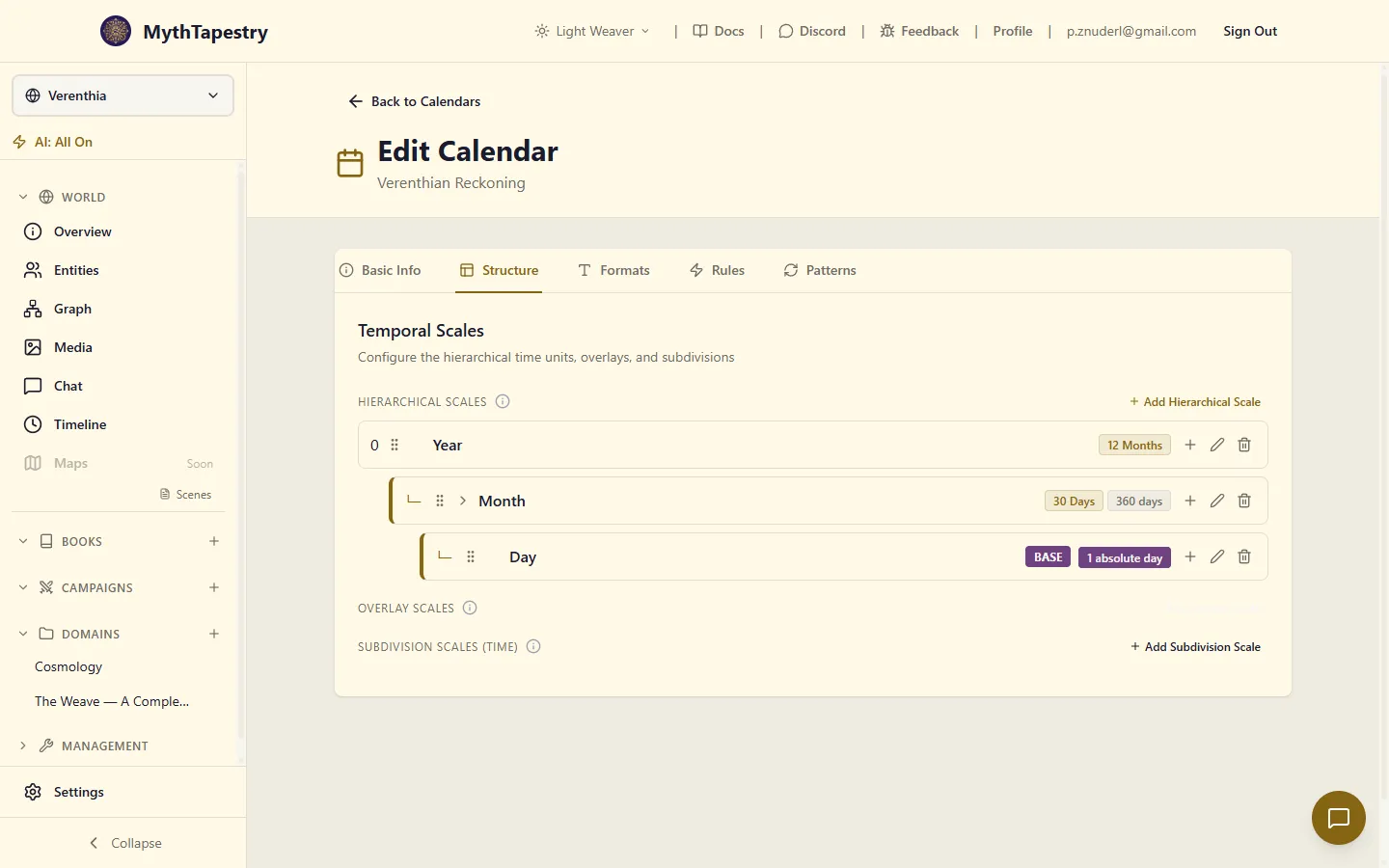
Section titled “Core concepts”Temporal scales
Section titled “Temporal scales”A calendar is built from temporal scales — the named levels of your timekeeping system. Year, Month, Day, Season, and Week are all examples of temporal scales. You define as many as your world needs, and each one has a type that controls how it behaves.
| Scale type | Purpose | Examples |
|---|---|---|
| Hierarchical | Nested time divisions, from large to small | Year → Month → Day; Age → Cycle → Beat |
| Overlay | A repeating cycle that runs across the hierarchy | A 7-day week; a moon phase cycle; a market cycle |
| Subdivision | Time within a single day | Hour, Minute, Second; Bell, Quarter; Watch, Glass |
Hierarchical scales
Section titled “Hierarchical scales”Hierarchical scales form the backbone of your calendar. They nest from large to small — a Year contains Months, which contain Days. You build this structure by linking each scale to its parent. The largest scale (Year, Era, or whatever you call it) sits at the root and has no parent.
At each level, you can define named units — the individual entries within that scale. The Month scale might have 12 named units: January through December, each with its own length in days. Scales without named units, like Year, simply count forward as numbers.
Overlay scales
Section titled “Overlay scales”Overlay scales repeat on their own cycle, independent of the months and years around them. A seven-day week is a good example: it rolls forward without caring where month boundaries fall. To define an overlay, you need three things:
- Cycle length — how many units in one complete cycle (e.g. 7 for a week)
- Cycle base unit — what the cycle counts in (days, for most cases)
- Anchor point — a specific day and which overlay unit it falls on (e.g. “the first day of Year 1 is a Monday”)
The anchor tells MythTapestry where the cycle begins on your calendar. Without it, the overlay has no fixed starting point.
Subdivision scales
Section titled “Subdivision scales”Subdivision scales break a day into smaller units: hours, minutes, seconds, or their equivalents in your world. They work inside a single day, separate from the date structure. See Time & Subdivisions for the full guide.
Temporal units
Section titled “Temporal units”Each hierarchical or overlay scale can contain units — the named entries within it.
| Property | Description |
|---|---|
| Name | The full label for this unit (e.g. “January”, “Monday”, “First Quarter”) |
| Abbreviation | A short form for compact display (e.g. “Jan”, “Mon”) |
| Ordinal | The unit’s position within the scale, counting from zero |
| Unit length | How many days this unit spans (for day-level hierarchical units) |
| Is variable | Check this if intercalation rules can change this unit’s length (e.g. February) |
Units without a name are displayed as numbers: “Month 3”, “Day 45”. Named units appear as their name in formatted output.
Intercalation rules
Section titled “Intercalation rules”Intercalation handles irregular adjustments to your calendar — extra days inserted periodically to keep it aligned. Leap years are the most familiar example.
Each intercalation rule has:
| Property | Description |
|---|---|
| Every N cycles | How often the rule fires (e.g. every 4 years) |
| Except every M cycles | Skip the rule at this interval (e.g. except every 100 years) |
| Re-include every P cycles | Override the exception (e.g. apply again every 400 years) |
| Targets | What changes when the rule fires |
Each rule applies one or more targets:
| Target type | What it does | Example |
|---|---|---|
| Extend unit | Add days to an existing variable-length unit | Add 1 day to February |
| Insert period | Insert a standalone period at a fixed position | Insert “Epagomenal Days” after day 360 |
Example — Gregorian leap year:
Every 4 years → extend February by +1 day Except every 100 years → skip it Except-except every 400 years → apply it anywayThis produces the familiar 365/365/365/366 pattern, with century years non-leap except those divisible by 400.
Format tokens
Section titled “Format tokens”Format strings control how dates display in your world. You build a format string from format tokens, each written as:
{ScaleName:formatter}{ScaleName:formatter:padding}ScaleName is the name of any temporal scale in your calendar (e.g. Year, Month, Day, Week, Season). formatter picks what to show. padding zero-pads the output to a minimum width.
Available formatters:
| Formatter | Output | Example (Month scale, January) |
|---|---|---|
value |
The numeric value at this scale | {Year:value} → 2024 |
num |
1-indexed number | {Month:num} → 1 |
unit |
Full unit name | {Month:unit} → January |
abbr |
Abbreviated unit name | {Month:abbr} → Jan |
day |
Day within the current unit, starting at 1 | {Day:day} → 15 |
day_ord |
Day with ordinal suffix | {Day:day_ord} → 15th |
sub_unit_name |
Custom day name from a unit’s sub_unit_names list (e.g. Roman day names) |
{Month:sub_unit_name} → Kal. |
Padding (optional third segment): :02 pads to at least 2 digits with a leading zero, :04 to 4 digits.
Format string examples:
| Format string | Displays as |
|---|---|
{Month:unit} {Day:day_ord}, {Year:value} |
January 15th, 2024 |
{Year:value:04}-{Month:num:02}-{Day:day:02} |
2024-01-15 |
{Week:unit}, {Month:abbr} {Day:day} |
Monday, Jan 15 |
{Season:unit} {Day:day_ord}, Year {Year:value} |
Spring 23rd, Year 1542 |
{Month:sub_unit_name} of Year {Year:value} |
Kal. of Year 2024 |
Any text between tokens is kept as-is. Create as many format strings as you like and mark one as the default. The default format is what the app uses when displaying dates throughout your world.
Creating a calendar
Section titled “Creating a calendar”- Go to Management > Calendars in the world sidebar.
- Click Create Calendar.
- Choose a preset — Gregorian, Lunar, or Custom — as your starting point.
- Enter a name and optional description for the calendar.
- If this calendar covers your whole world (rather than a specific region or culture), toggle Global on.
- Review the structure preview showing your temporal scales.
- Click Customize Structure to add, edit, or remove scales, units, and intercalation rules.
- Review and edit format strings to control how dates from this calendar display.
- Save the calendar.
Calendar fields
Section titled “Calendar fields”| Field | Required | Description |
|---|---|---|
| Name | Yes | A unique name for this calendar within your world |
| Description | No | Notes about this calendar’s cultural or historical context |
| Days per year | Yes | The total number of days in a standard year before intercalation (e.g. 365, 354, 360) |
| Global | No | Whether this calendar applies world-wide or only to a specific region or culture |
| Epoch description | No | A label for what Year 1 represents (e.g. “Years since the Founding”, “After the Sundering”) |
Dating things before Year 1
Section titled “Dating things before Year 1”Your epoch is wherever you decided to start counting — the Founding, the Sundering, a coronation. It is almost never the beginning of your world’s history, and MythTapestry does not treat it as one. You can date anything before it.
Count backwards and you get negative years, exactly the way BC works: the year before Year 1 is Year -1. There is no Year 0. So a creation myth set nine thousand years before the Founding sits at Year -9000, and it sorts, filters and displays like any other date.
This matters most for:
- Creation myths and deep history. “The Sundering, 9,000 years before the Founding” is a date, not a note in a description field. Put it on the timeline and your gods’ war shows up in the same view as last week’s tavern brawl.
- Calendars that start at a reset. If your empire recounts years from its conquest, everything before the conquest is pre-epoch — which is most of your world.
- Imported worlds. If you imported a map and later chose an epoch partway through its history, the events before that point still date correctly. You do not have to redo the import or move your epoch.
How calendars apply across your world
Section titled “How calendars apply across your world”MythTapestry uses a simple priority system to decide which calendar applies where:
World default calendar └── Content unit override (a chapter set in a different culture) └── Inline date mark override (a single date mention in your prose)- World level: The calendar you designate as global is used everywhere by default — events, entity fields, and date references all inherit it.
- Content unit level: Each chapter or scene can override the calendar if the narrative takes place in a culture that uses a different one.
- Inline mark level: Individual date references in your writing can specify their own calendar, overriding both the world and content unit defaults.
Linking two calendars
Section titled “Linking two calendars”If your world has multiple calendars, you can establish a calendar reference date to align their timelines. You specify one date in Calendar A and the equivalent date in Calendar B. From that anchor, MythTapestry can convert any date in either calendar to the other.
Example: “Year 1 of the Imperial Calendar is the same day as Year 433 of the Old Calendar.” After setting this reference, a date entered in the Imperial Calendar automatically shows its Old Calendar equivalent wherever both are relevant.
- Go to Management > Calendars.
- Open the calendar you want to align (the source calendar).
- Click Link to another calendar.
- Choose the target calendar — the one you’re aligning with.
- Enter the source date in the source calendar’s own notation.
- Enter the target date — the matching date in the target calendar.
- Add an optional description (e.g. “Imperial Year 1 = Old Calendar Year 433”).
- Save the reference.
After linking, date conversion between the two calendars is automatic.
What the Gregorian preset includes
Section titled “What the Gregorian preset includes”- Hierarchical scales: Year → Month (12 named units, January–December, with variable lengths) → Day
- Overlay scale: Week (7-day cycle: Monday–Sunday)
- Subdivision scales: Hour (24 per day) → Minute (60 per hour) → Second (60 per minute)
- Intercalation: Two rules implementing the standard Gregorian leap year pattern
- Format strings: ISO 8601, Long Date, Date & Time, Weekday Date, and Short Numeric
Building a custom fantasy calendar: example
Section titled “Building a custom fantasy calendar: example”Here is a complete structure for a fantasy world with seasonal months and a ten-day week:
| Scale | Type | Structure |
|---|---|---|
| Era | Hierarchical (root) | Numeric counter; no named units |
| Year | Hierarchical | Numeric counter; 360 days |
| Season | Hierarchical | 4 named units: Spring, Summer, Autumn, Winter (90 days each) |
| Day | Hierarchical (leaf) | Numbers 1–90 within each season |
| Tenday | Overlay | 10-day cycle with units: Firstday through Tenday |
| Hour | Subdivision | 24 per day |
| Minute | Subdivision | 60 per hour |
A format string for this calendar:
{Tenday:unit}, {Day:day_ord} of {Season:unit}, Year {Year:value} of Era {Era:value}Displays as: Sixthday, 23rd of Summer, Year 1542 of Era 3