
Chat with Your World
MythTapestry includes an optional chatbot that can answer questions about your world using your actual entities, relationships, and content. It never invents information — every answer is grounded in your data.
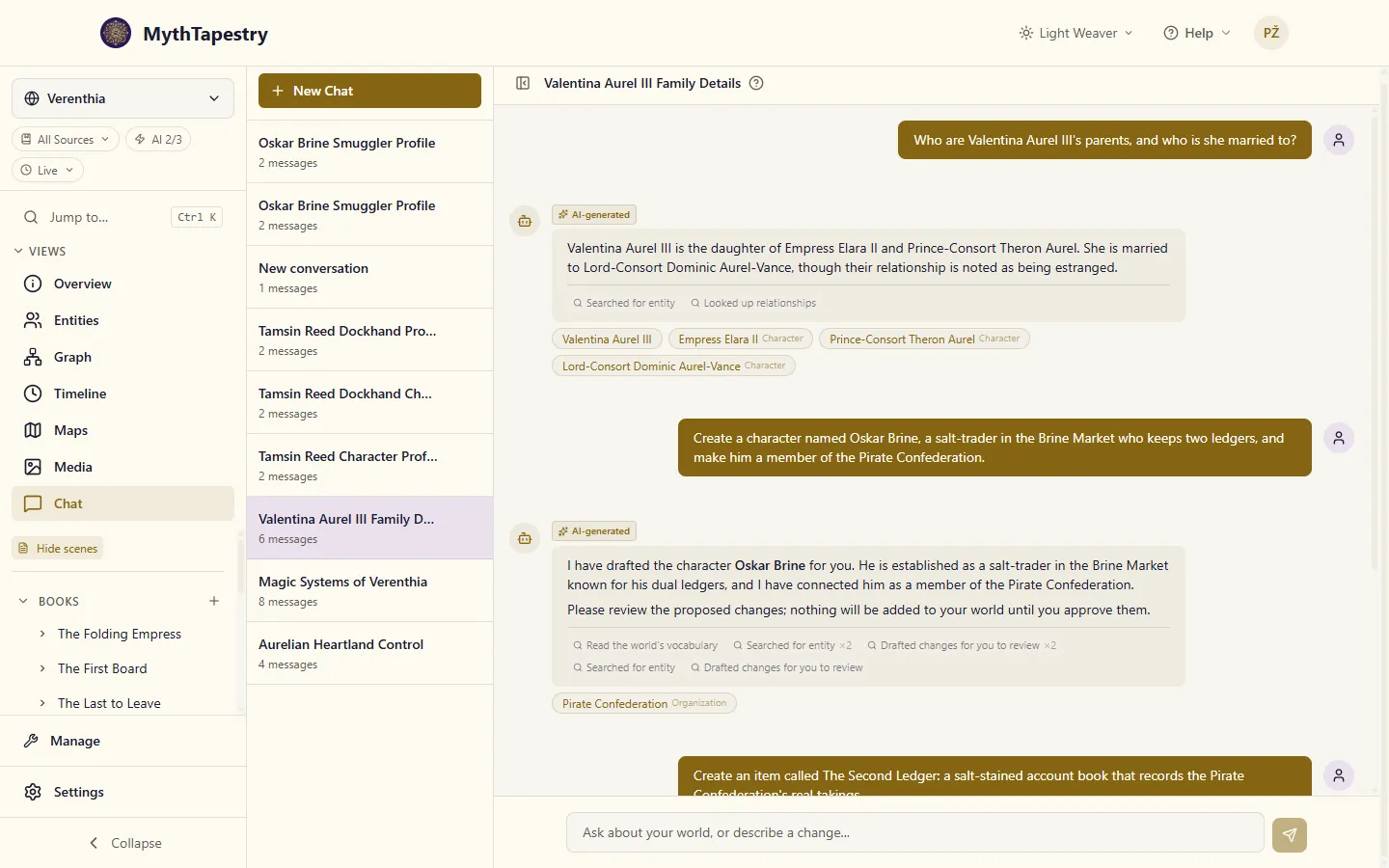
It does three things: answers questions about your world, answers questions about how to use MythTapestry, and — when you ask it to — drafts new people, places, chapters and scenes for you to review. Nothing it drafts is written to your world until you approve it.
The Chat page is always in the world sidebar. The floating chat widget that follows you around the other pages is off by default — switch it on in World Settings → Chat.
How to use chat
Section titled “How to use chat”There are two ways to access chat:
Full chat page
Section titled “Full chat page”Navigate to Chat in the world sidebar to open the full chat interface with:
- A sidebar listing your chat sessions
- Markdown rendering in responses
- Copy button on messages
- Session history with auto-generated titles
Floating widget
Section titled “Floating widget”Once you switch on Floating Chat Widget in World Settings, a floating chat button appears in the bottom-right corner of every page (except the Chat page itself). Click it to open a quick chat overlay without leaving your current page.
What you can ask
Section titled “What you can ask”The chatbot reads from the entities, relationships, and scenes you’ve built. Useful questions look like:
- “Who are the members of the Iron Council?”
- “What relationships does Aldric have?”
- “Tell me about the magic system in this world”
- “What happened at the Battle of Thornfield?”
- “What locations are in the Northern Wastes?”
- “Which chapter has the scene where the bridge collapses?”
Questions about your world that aren’t recorded anywhere in your world won’t get answered — the chatbot will say so rather than invent. If it should know but doesn’t, it’s a sign the entity or scene needs to be added.
Under an answer you’ll find a chip for each entity the answer names — Valentina Aurel III · Character, say — that opens its page. To answer, the chatbot often looks through many more entities than it ends up talking about; those don’t get chips, so the row stays short and every chip is something you just read about. The type on the chip uses your world’s own name for it.
It can follow a chain
Section titled “It can follow a chain”Some questions don’t have a one-step answer. Say your world has a settlement called Kettle Ford, sitting in a region called Vaelen Reach, which is controlled by an organization called The Silver Concord, led by a character named Maren Oskarr. Ask “Who leads the settlement of Kettle Ford?” and the chatbot works backward through that chain on its own, then shows its work:
The settlement of Kettle Ford is led by Maren Oskarr. The chain of authority is as follows: Kettle Ford is located in Vaelen Reach, which is controlled by The Silver Concord, an organization led by Maren Oskarr.
You don’t have to ask about the region and the organization separately — it follows the relationships for you and tells you the path it took, so you can check its reasoning against your own notes.
It searches what you’ve actually written
Section titled “It searches what you’ve actually written”Ask “which chapter has the river rising over the crossing?” and it looks inside your prose, not only at chapter titles and summaries. A scene is findable by what happens in it, even when the title says nothing about it and you never wrote a summary.
The chapter titled High Water describes it. The text reads: “The river rose overnight until it ran level with the stones, and the crossing was lost for three days.”
It quotes a short extract around each matching word so you can see why it picked that chapter. It finds chapters, parts and books too, by their titles and descriptions — so “find the chapter about the Arcane Order” turns up Chapter 3: The Arcane Order itself, not just the scenes that happen to say “Arcane Order”.
Some things worth knowing about how the search matches. It matches on the words you use, and on other forms of those words — searching “armies” finds “army”. A scene doesn’t need every word of your question: the scenes with the most of them come first. It does not match on meaning: if you ask about a “confrontation” and your prose only ever calls it a “quarrel”, it will not find it. Use words you think you actually wrote. And a match in a title counts for more than a match in a summary, which counts for more than a match deep in the body, so the most likely chapter comes first.
It reads a whole scene when you ask
Section titled “It reads a whole scene when you ask”Extracts and summaries aren’t the whole story, and the chatbot doesn’t read your full text on its own initiative. Ask “what happens in Chapter 3?” and it tells you what’s in the chapter — its scenes, in your order, with their summaries — and, if that isn’t enough to answer, which scene the answer is probably in, with an offer to read it. Say yes, or ask outright — “read me the scene where Kael meets Lira” — and it reads the scene, or the whole chapter, and answers from the text.
What it won’t do is tell you something isn’t written just because it hasn’t read it. “I can see it’s in The Tower of Glass; shall I read it?” is the answer you get instead of “that happens off-page”.
It counts as asking when your message asks it to read — “read me…”, “please read…”, “can you read…” — or says quote, show me the scene (or the text, the chapter, the passage), full text or exact words. A short yes, sure or go ahead straight after it offers to read counts too. Some messages don’t count:
- “Don’t read it, just tell me who’s in it” declines, and so do “don’t quote it” and “I don’t need the full text”.
- “What did Kael read in the library?” is about your story.
- “Ok, and what about the ending?” is a new question, not a yes. That check runs on MythTapestry’s server, not in the AI: the AI can ask for the text, but only your own words release it. The wording it listens for is English, so if you write to it in another language, say yes to its offer in English, or switch on the setting below.
Or let it read whenever it needs to
Section titled “Or let it read whenever it needs to”If you’d rather not be asked, switch on Let chat read my writing in World Settings → Chat. Chat then reads a scene or chapter whenever a question needs it, and answers about your story get fuller: “what happens at the end?” is answered from the Epilogue itself, not from its summary. The setting is per world.
Newly written prose is searchable as soon as it is saved. There is no indexing step to wait for.
It finds entities by their other names
Section titled “It finds entities by their other names”If you’ve recorded “the Empire” as another name for The Silver Concord, asking about the Empire finds The Silver Concord — and the chatbot says so, rather than quietly answering as if you’d typed the real name:
The Silver Concord, also known as the Empire, controls the territory of Vaelen Reach.
That matters because a silent match is worse than no match: you’d have no way to tell whether it found the right entity or missed it and answered about something else.
It asks instead of guessing
Section titled “It asks instead of guessing”If a name could mean more than one thing in your world — say you have both an organization called The Silver Concord and a road called The Concord Road, and you ask about “the Concord” — the chatbot stops and asks which one you mean instead of picking one for you. This is deliberate: a wrong guess would read as a confident, wrong answer, and you’d have no way to know it had guessed at all.
It answers in your calendar
Section titled “It answers in your calendar”If your world has a calendar, the chatbot answers dates in it — the way you’d write them yourself, not as a raw day count — and you can ask it questions using those same dates. If a world hasn’t set up a calendar yet, you’ll get a plain day number instead; the chatbot won’t invent a calendar to make its answer look nicer.
It speaks your world’s vocabulary
Section titled “It speaks your world’s vocabulary”The chatbot answers using the entity types and relationship wording you defined, including ones you invented yourself. If you call your organizations “bloodlines” and your leadership relationship “holds sway over,” that’s the language you’ll get back.
It can also build things, not just describe them
Section titled “It can also build things, not just describe them”Everything above is chat reading. It also writes — if you let it.
Ask for something that doesn’t exist yet and it drafts the change instead of answering a question:
Create a smuggler called Kessa Vaun who works for the Iron Syndicate
You get a card listing what it proposes — here a new character and a relationship connecting her to the Iron Syndicate. You can expand any item to correct what it filled in, reject the parts you don’t want, and apply the rest. Your world is untouched until you click Apply, and only the items still checked at that moment are written.
It isn’t limited to characters and connections. It can draft the types that describe your world (a new kind of entity, a new kind of relationship), the containers your writing lives in, and the writing itself — ask for a scene and it drafts the prose into the card, where you can read and rewrite it before a word of it lands.
Typing / in the message box offers /create, /edit and /link as a shortcut for starting one of these requests.
Ask it how to use MythTapestry, too
Section titled “Ask it how to use MythTapestry, too”The chatbot doesn’t only know your world — it knows this documentation site as well, so you can ask it how to do something instead of hunting through these pages yourself. Try:
- “How do I set up a calendar?”
- “Where do I change which AI model it uses?”
It answers from the documentation page that covers the question, links to that page, and, where there’s a specific screen for what you asked about, links straight there too.
How it works
Section titled “How it works”When you ask a question, the chatbot:
- Rewrites your question so things like “she”, “they”, or “the same one” point to the right entity, using earlier turns of the conversation
- Looks things up in your world — entities, relationships, and what you’ve written (the full text of a scene only when you ask for it) — using a small set of pre-defined lookups
- Reads what came back and decides whether it has enough to answer
- Writes the answer using only what it found in your world
If the first lookup doesn’t have everything it needs, it can do up to six more rounds before it has to answer with what it has.
Each session answers one question at a time. Send a second message in the same session while the first is still being answered, and it’s turned away; wait for the answer, or open another session.
If the AI goes quiet for a minute and a half partway through an answer, the chatbot stops waiting and tells you so. That question isn’t charged; ask it again. If one of its lookups in your world stalls for two minutes instead, the answer ends with a timeout message.
Memory inside a session
Section titled “Memory inside a session”Each chat session has its own memory:
- Your most recent messages are passed through in full
- Older ones get folded into a short running summary so long sessions stay coherent without ballooning costs
- The session also tracks which entities you’ve been talking about, so follow-ups about “she” or “that battle” land on the right thing
If you want a fresh memory, start a new session.
Sessions
Section titled “Sessions”Sessions are saved automatically — there’s no save button. You can:
- Start a new session for a new topic (recommended over jumping topics inside one session)
- Switch between sessions in the sidebar
- Delete sessions you no longer need
Each session gets an auto-generated title based on its first message, so the sidebar stays scannable.