
Content Containers & Units
MythTapestry organises your writing into containers (the shelves and binders of your world — books, campaigns, encyclopaedia domains) and content units (the actual pieces of writing inside them — scenes, session notes, articles). Containers can hold other containers, so your structure can be as flat or as deep as your project needs.
The starting structures
Section titled “The starting structures”Every world comes with three ready-made structures. They’re starting points, not rules — see Make the structure your own below.
For novels, novellas, and story collections.
- A book contains chapters, ordered by sequence
- Chapters contain scenes — the individual pieces you write
- A book carries fields like Genre, Status, Target word count, and Story structure (Hero’s Journey, Three-Act, Save the Cat, and more)
Campaigns
Section titled “Campaigns”For tabletop and game-oriented worlds.
- A campaign contains sessions, one per sitting at the table
- Sessions contain segments — recaps, encounter notes, and narratives
- Campaigns carry fields like Game system, Status, Campaign setting, Play schedule, and Average party level
Encyclopaedia domains
Section titled “Encyclopaedia domains”For reference-style lore.
- A domain holds articles directly — no in-between layer
- Domains are top-level by default. To nest them (“History” → “The Sundering Wars”), edit the Domain type, set its level to Any Level, and tick Domain under its own Allowed Child Types
- Ideal for topics like Geography, Magic, or Pantheons
Make the structure your own
Section titled “Make the structure your own”The books/campaigns/domains layout is only the default. Structure is driven by type definitions that you can extend from Content Types in the world sidebar:
- Add a level above. Writing a trilogy? Create a Series container type that holds books, and group The Crownfire Cycle’s three volumes under one roof.
- Add a level between. Prefer acts? Create an Act type that sits between book and chapter (walked through below).
- Add your own piece types. Create an Interlude or Letter content type alongside scenes, each with its own fields.
- Change what the forms ask for. Every container and content type carries a field list. Edit the type — add Point of view to scenes, or Location to sessions — and every create/edit form for that type updates to match. No two worlds need the same shape.
Adding a level: acts in a book
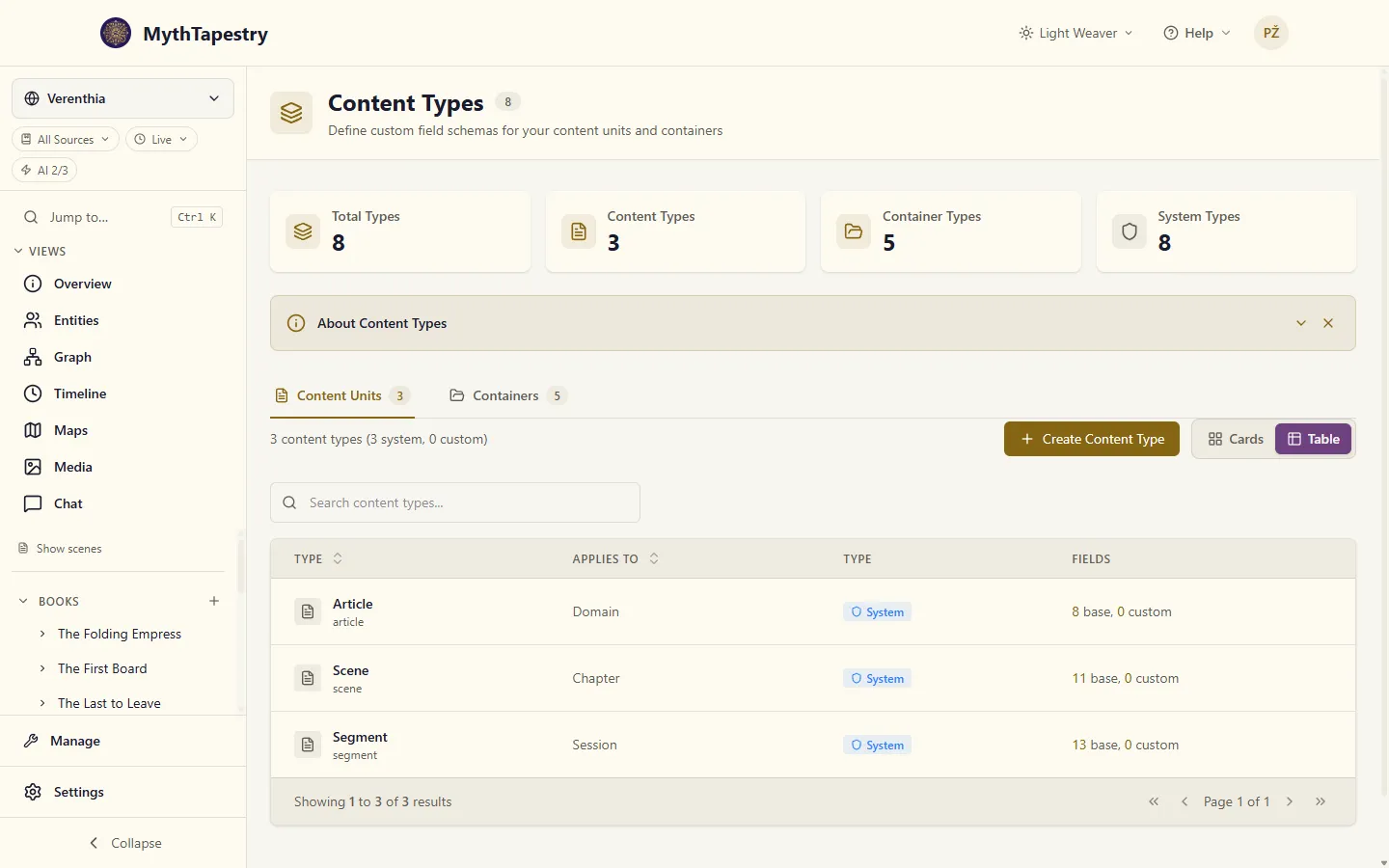
Section titled “Adding a level: acts in a book”- Open Content Types from Manage in the world sidebar, switch to the Containers tab, and click Create Container Type.
- Name it Act. The slug,
act, fills in from the name; change it before you create the type if you want another. It can’t change afterwards. - Open Type Definition Settings. Set the level to Child Only, tick Book under Allowed Parent Types, and tick Chapter under Allowed Child Types.
- Click Create.
You only need to tick each link once. Saying Act’s parent is Book also makes Act one of Book’s children, so the Content Types page now reads Children: Act, Chapter on Book and Parent: Act, Book on Chapter. Untick it on either type and it goes from both.
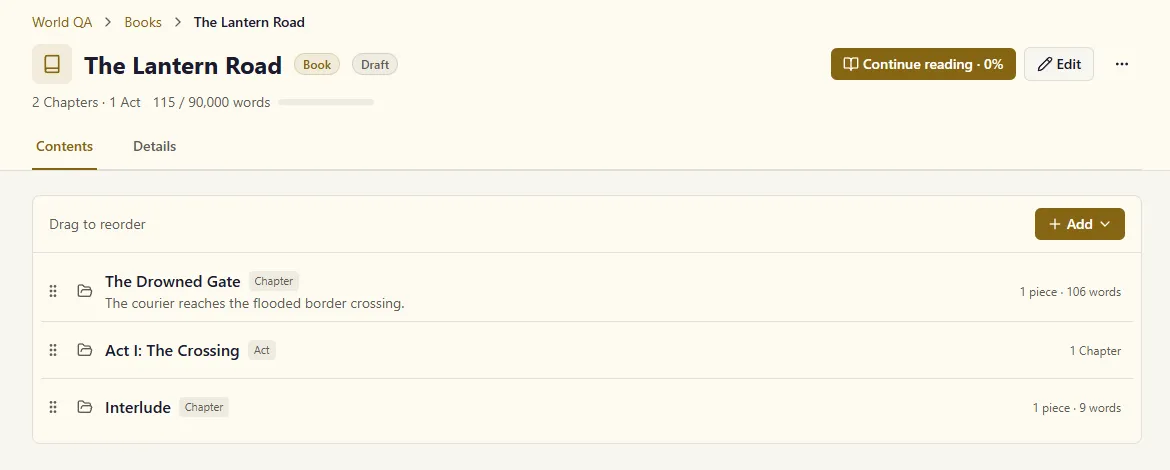
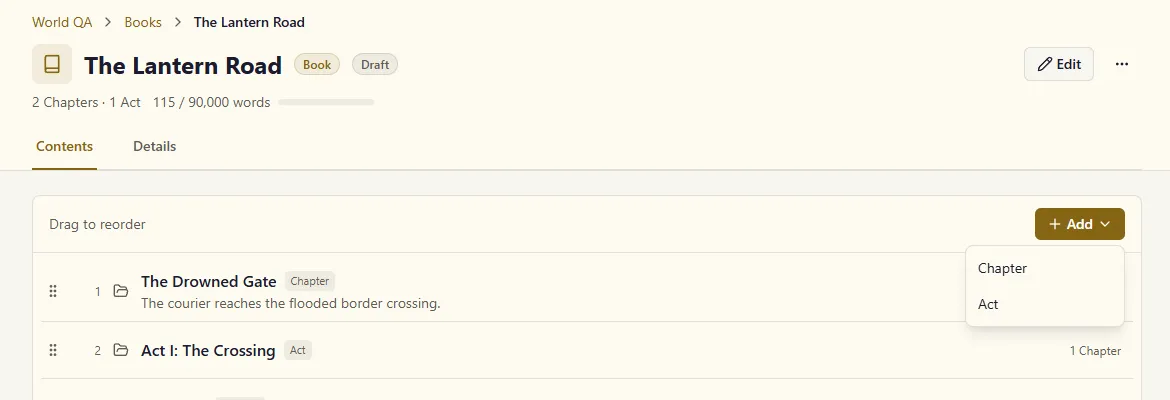
Every book’s Add button now opens a menu with Chapter and Act, and each act’s page offers Add Chapter. Books you wrote before adding acts take them too, and keep their chapters where they are. A book’s page counts what it holds by type, 2 Chapters · 1 Act, and when a book holds both, each row names its type. A chapter inside an act opens under that act, and its breadcrumb runs Books › The Lantern Road › Act I: The Crossing › The Ferryman.
The container page
Section titled “The container page”A book, campaign or domain opens on one page:
- The breadcrumb at the top names every level above it, each a link: World QA › Books › The Lantern Road › Act I: The Crossing.
- The header carries the type and, when the type has a Status field, the status as a badge. The line under it counts what the container holds (2 Chapters · 1 Act) and its words. When the type has a Target word count, it shows progress toward it: 115 / 90,000 words, with a bar.
- Read opens the container in the reader, the way a reader would see it. Once you’ve started, it says Continue reading · 42% and opens where you left off.
- Edit opens every field on one page. ⋯ holds Generate Outline (books) and Delete.
- Contents lists everything inside — parts and pieces together, in one order: title, its first line, and its counts. Drag a row by its handle to put it anywhere in that order, so a Prologue can sit above Part 1 and an Epilogue below Part 3; if the new order can’t be saved, the rows go back where they were and a message says so. Add offers everything the type takes, and adds it at the end; a type that takes one kind gets a plain Add Chapter button instead of a menu.
- Details shows the description and the type’s fields in their groups, When does this happen?, and, on a book, the outline’s story structure.
The page remembers its tab in the address, so a link to …?tab=details opens on Details.
Editing a field where it is
Section titled “Editing a field where it is”On the Details tab, click a field’s pencil, or the value itself, and it turns into the same box the Edit page uses. Enter saves it; in a long field such as Description, Enter starts a new line and Ctrl+Enter saves. Escape puts the old value back.
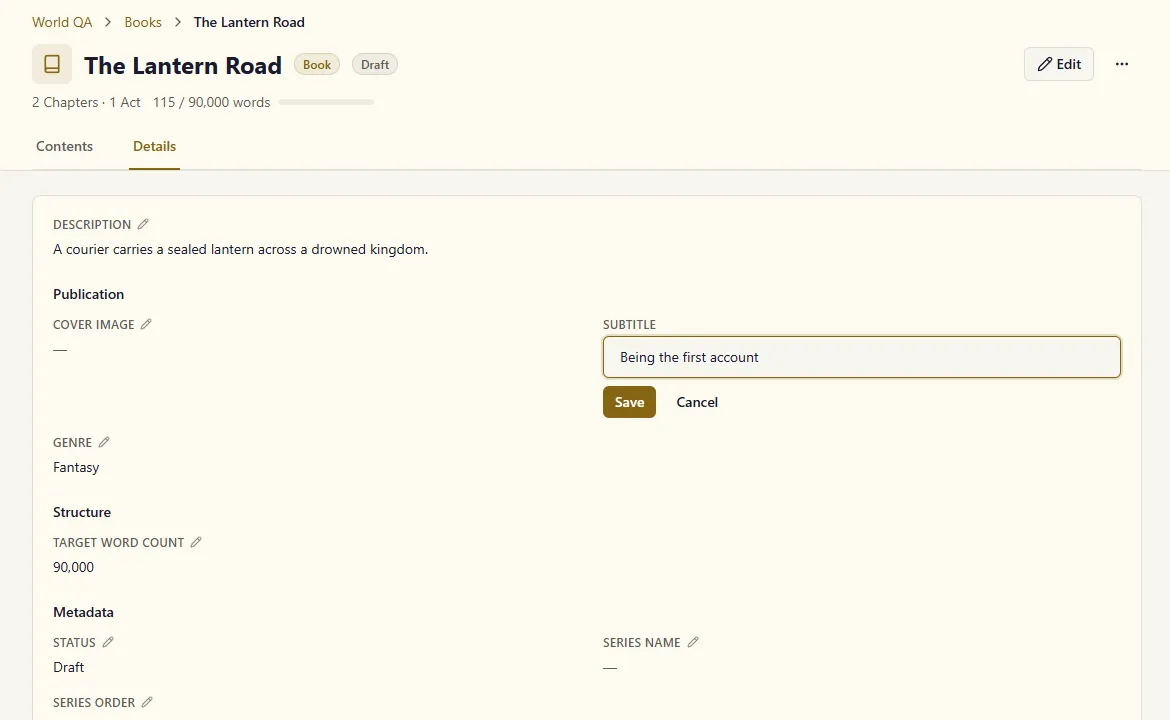
One field is open at a time. Open another while you have typed something and you’re asked whether to discard it. Leave the page with a field changed and the usual unsaved-changes prompt offers Save and leave.
Saving one field changes only that field. If you changed Series Name in another tab a minute ago, saving Subtitle here keeps it.
A value the field’s choices don’t list stays as you wrote it. A Book whose Genre was typed as Fantasy, Noir shows Fantasy, Noir, and Noir stays ticked when you edit Genre.
Container fields
Section titled “Container fields”| Field | Description |
|---|---|
| Title | The container’s name |
| Description | A short summary shown on its page |
| Sequence number | Position among everything in its parent — drag on the Contents tab to change it |
| The type’s fields | Everything else: a book’s Genre, Status, Target word count, a campaign’s Game system, a session’s Session date. They’re ordinary fields of the type, so you can rename them, change their choices, or add your own in Content Types |
A type has one list of fields. The create dialog, the Edit page and the Details tab all show the same list, grouped the same way. The create dialog shows the first group, and any group with a required field, and keeps the rest behind More fields so a new book starts short.
Finding a container
Section titled “Finding a container”A type’s list page has one toolbar: Search matches titles and descriptions, Sort puts them in your own order, by title, or by last update, and the last control switches between cards and a table. The table has a Status column when the type has a Status field.
Content units
Section titled “Content units”A content unit is an individual piece of writing — a scene in a chapter, a segment in a session, an article in a domain. This is where your prose lives.
Content unit fields
Section titled “Content unit fields”| Field | Description |
|---|---|
| Title | The unit’s title |
| Content | Your writing, in a full rich-text editor |
| Summary | A short recap — write your own or generate one with AI |
| Narrative importance | Major, minor, or background — how much weight AI features give this piece |
| When does this happen? | The unit’s position on your world’s timeline (see below) |
| Custom fields | Fields from the unit’s content type — a scene’s Scene type or POV character |
Narrative importance
Section titled “Narrative importance”- Major — key scenes, pivotal events, cornerstone articles
- Minor — supporting content, secondary details
- Background — flavour text, ambient details, background lore
The world chat and other AI features use this to decide how much attention each piece deserves when answering questions about your world.
When does this happen?
Section titled “When does this happen?”Each content unit can record when in your world’s history it happens — the coronation scene takes place in Year 512, the prologue thirty years earlier. Settings inherit down a chain, so you only override where needed:
World defaults → this content unit → individual date marks in the textIn the scene editor, the panel sits in the Properties sidebar; on a container’s page it’s a section of the Details tab. It lets you set:
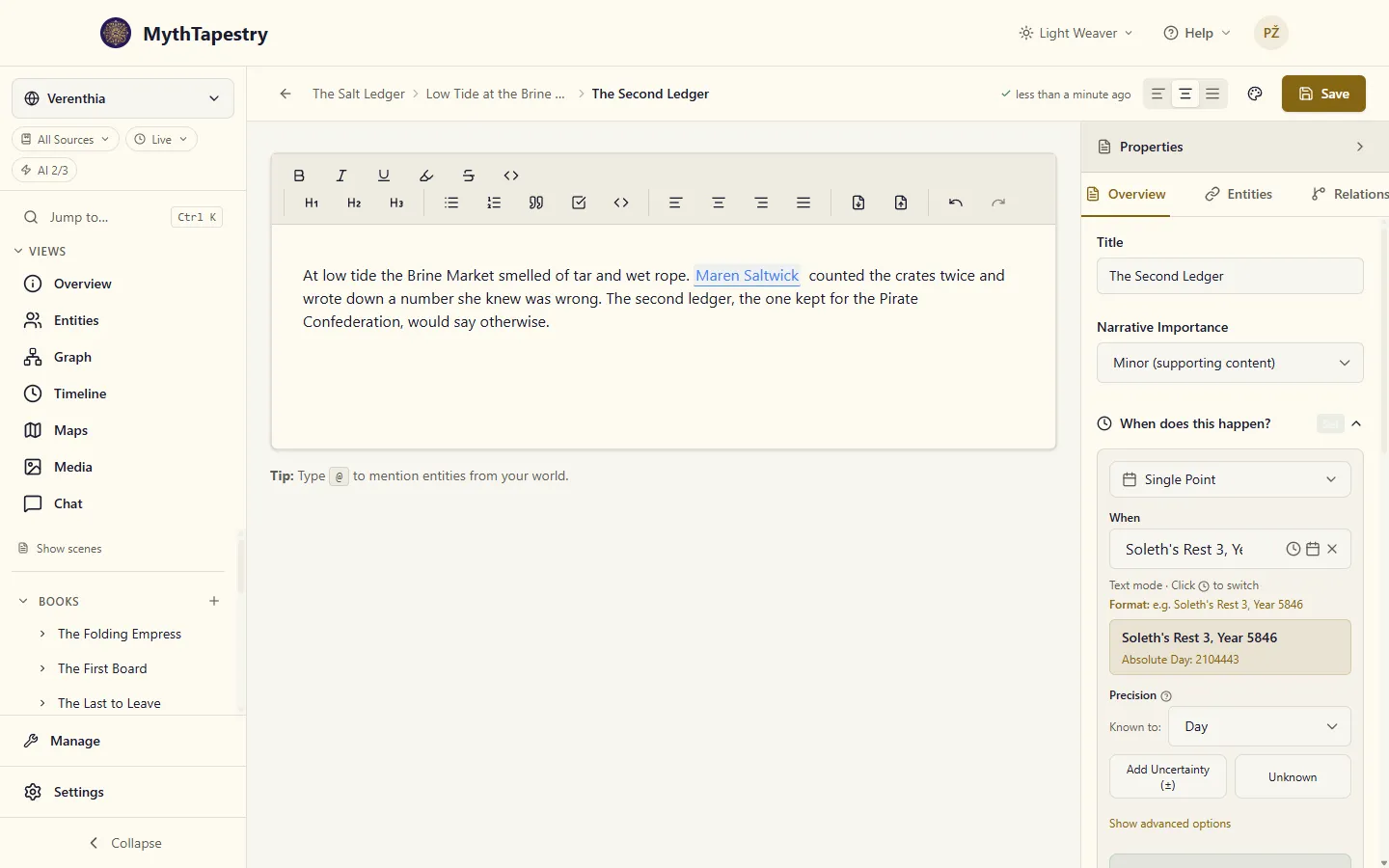
| Field | Description |
|---|---|
| Calendar | Which of your world’s calendars to use (defaults to the world’s primary) |
| Start / End | When this piece begins and ends on the timeline |
| Precision | How exact those dates are. Known to lists your calendar’s scales from the largest down (Year, Month, Day), then its times of day (Hour, Minute), then scales that run alongside them, such as Week |
Each date can carry a time of day, in your calendar’s own divisions of the day: the duel at the Brine Market starts at Bell 13 and ends at Bell 14. Changing the day keeps the time you set.
A date range must end on or after the day it starts. An end date before the start date is refused, with the reason shown under End Date. On the same day, an end time before the start time is refused the same way: Ends before it starts.
Nothing is saved until what you’ve entered makes a whole date. Switch a session from Single Point to Date Range and type a start, and the panel holds it and tells you it needs an end date; once you add the end, the range is saved, once. If a save is ever refused, the panel shows the reason and keeps what you typed, so the screen never shows one date while another is stored.
Computed Bounds under the panel shows the first and last day the setting covers, in your calendar. A session on 14 March 1205 reads Earliest: 14 March 1205 | Latest: 14 March 1205. Known to starts at your calendar’s finest level, the day in most calendars, so a date you typed to the day is treated as known to the day.
Narrative Time Context
Section titled “Narrative Time Context”Under When does this happen? in a scene’s Properties sidebar, Narrative Time Context sets the calendar and the stretch of time the scene’s writing lives in. Date marks in the text that don’t name a calendar or a precision take them from here.
| Field | Description |
|---|---|
| Calendar | The calendar this scene’s dates are read in, Starts and Ends included: they show, take and pick dates and times in it. World default uses your world’s primary calendar |
| Starts / Ends | Where the scene opens and closes on your timeline, each with a time of day if your calendar divides its day |
| Precision | How exact the dates in this scene are. Exact (to the day), or one of your calendar’s scales, such as Month or Season |
The time sits under the date, in your calendar’s own divisions of the day. In Verenthia, The Second Ledger starts on Soleth’s Rest 3 at Bell 9 and ends the same day at Bell 11. Leave the time empty, or empty its boxes later, and the scene takes the whole day.
Changed your mind? Empty any field and it stays empty after you save; clearing a date clears its time with it. Clear narrative time context, under the fields, empties all of them at once, and the scene goes back to your world’s default calendar.
These dates are also how far your story has got. Latest in canon and After ⟨book⟩ in the time selector jump to the furthest moment a scene reaches: where it ends, or where it starts if it has no end, time of day included. A scene that ends at Bell 11 counts as later than one that takes the whole of that day.
The editor
Section titled “The editor”Content units open in a full-featured writing environment, with the formatting toolbar above your text and the Properties sidebar beside it:
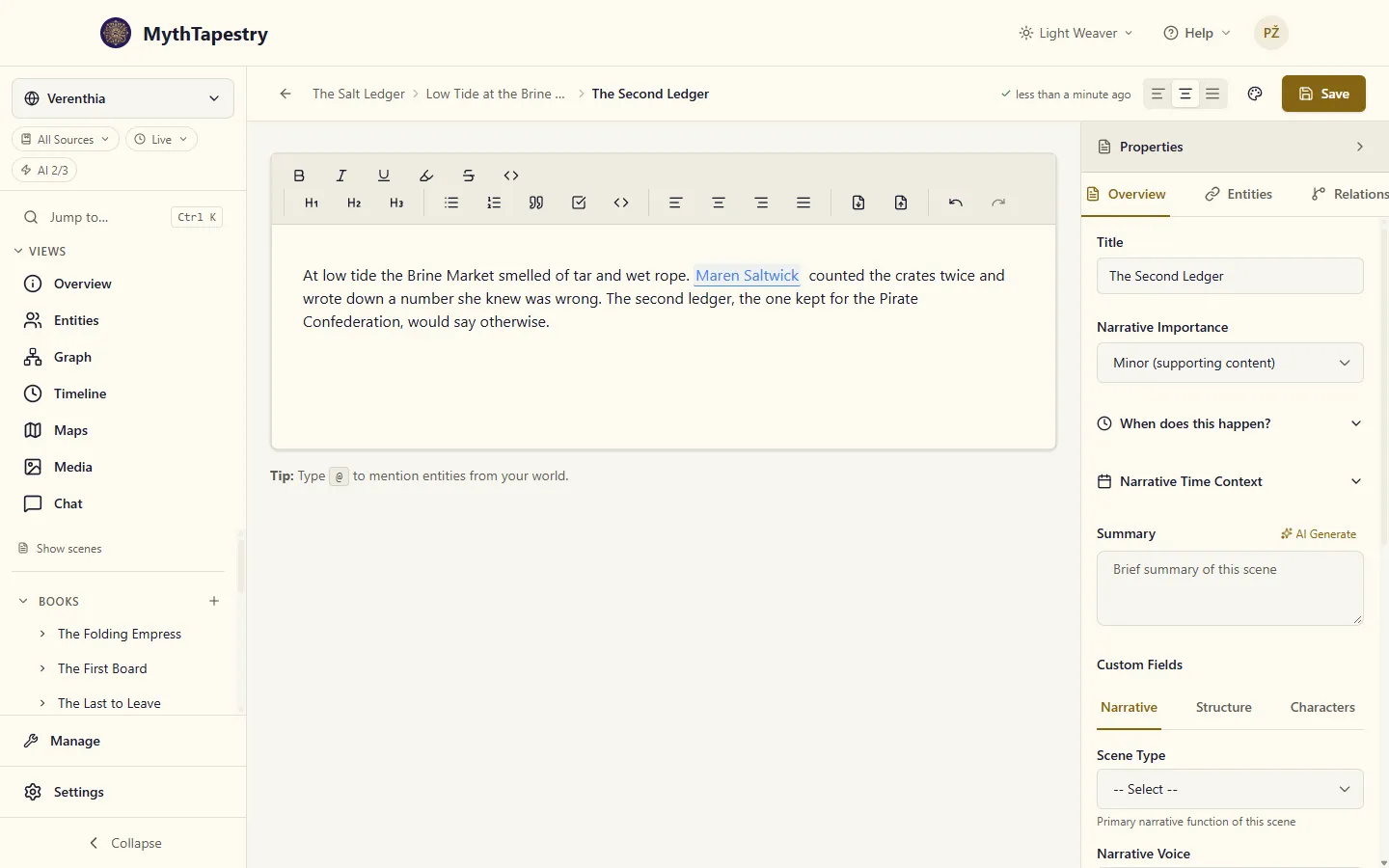
- Text formatting — headings, bold, italic, lists, blockquotes
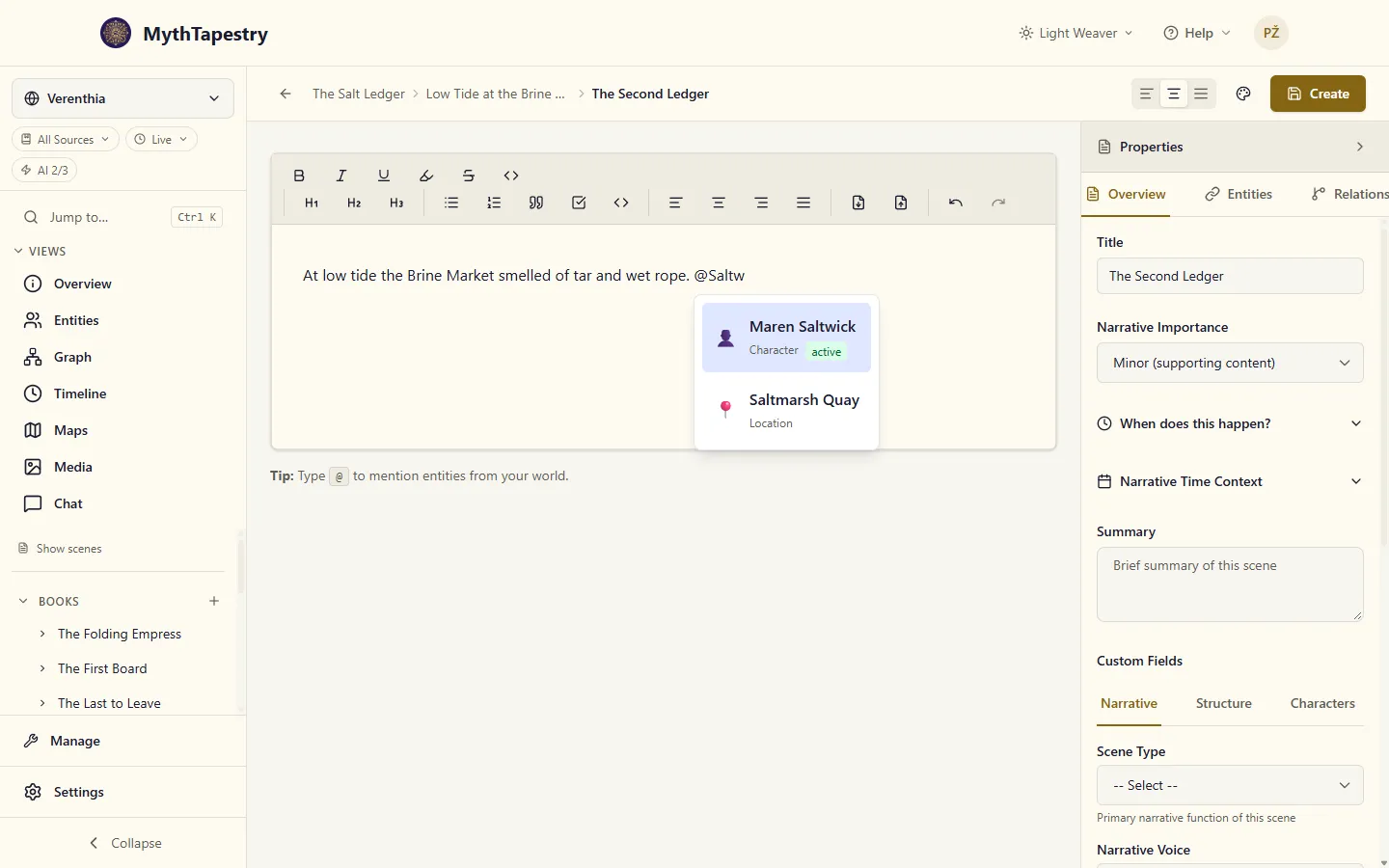
- Entity mentions — type
@and the start of a name to link a character, place, or faction inline. Names with spaces work too:@Saltwand@Maren Salboth find Maren Saltwick. Once nothing matches what you’ve typed after a space, the list closes and you carry on writing. Picking a name adds a space after it; type a comma or full stop next and it takes the space’s place, so you get Maren Saltwick, rather than Maren Saltwick , - Date mentions — type
[[to insert a date chip from your calendar - Inline date links — select any phrase and pin a precise date to it (see Inline Temporal Marks)
- AI entity detection — highlights people and places it recognises in your text
- Autosave — your work is saved as you type
- Read this piece — the book icon in the toolbar opens the scene in the reader, inside its chapter, so you can read on past it
Everything you write also feeds your world’s knowledge graph: mentioned entities gain connections you can explore in the graph view, and the world chat can answer questions from your content.
Creating content
Section titled “Creating content”These steps follow a book. Campaigns and domains work the same way, with their own names for each level: a campaign’s page offers Add Session, and a domain’s offers Add Article.
- Click + next to Books in the world sidebar, give it a title, and click Create Book.
- On the book’s Contents tab, click Add Chapter (or Add, then Chapter, if your books also take acts).
- On the chapter’s page, click Add Scene. The editor opens on a new, unsaved scene.
- Give it a title, write, and click Create. From then on it autosaves, and the button reads Save.
- Optionally set When does this happen? so the piece lands on your timeline.